
CloudinoPRO
  • 0 Votre panier
  • Espace client
  • Magasin
    • Tout parcourir
    • Hébergement cPanel Standard
    • Hébergement WordPress
    • Hébergement Multi-Sites
    • Cloud VPS Hosting
    • OpenXchange
    • Email Spam Filtering
    • Google Workspace
    • SSL Certificates
    • CodeGuard
    • SiteLock
    • Marketgoo
    • NordVPN
    • Weebly Website Builder
    • 360 Monitoring
    • Email professionnel
    • Services de courrier électronique
    • Certificats SSL
    • Sauvegarde de site Web
    • Sécurité de site Web
    • Outils SEO
    • VPN
    • Constructeur de sites Web
    • Surveillance des sites et des serveurs
    • Enregistrer un nom de domaine
    • Transférer un nom de domaine
  • Actualités
  • Base de connaissances
  • Contactez-nous
  • Plus
  • Espace client
    • Connexion
    • Inscription
    • Mot de passe oublié?
  1. Accueil
  2. Base de connaissances
  3. WHM
  4. WHM (For Resellers)
  5. How to Remove a Feature List from WHM

  Catégories

Backup/Restore
4
Cloudflare (cPanel)
9
CloudLinux (cPanel)
10
cPanel - Control Panel
24
Databases
11
DirectAdmin
48
DNS - Nameservers
6
Domain Management
10
Email
17
FTP
9
Installing a Control Panel
6
Mail Filters & SPAM
8
Mobile
11
Others
3
PayPal
7
Plesk
47
Security
10
SiteWorx (Control Panel)
58
Softaculous
69
SolusVM
18
SSL
5
Virtualizor
19
WHM
18
WordPress
17

  Catégories

  Assistance

Support
Actualités
Base de connaissances
Téléchargements
État du réseau
Ouvrir une demande

How to Remove a Feature List from WHM Imprimer

  • 0

Follow this tutorial if you have a feature list you don't need and want it removed.


1. Log in to your WHM Account.


2. Go to Packages >> Feature Manager or type Feature Manager in the menu filter box. The option will appear. Click on it.
whm-reseller-feature-manager-menu.gif


3. Under Manage feature list, choose the feature list you wish to remove
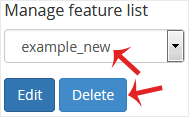
whm-reseller-featuremanager-remove-list.gif


4. Click on Delete.


Congratulations. Your selected feature list has been successfully removed.


Cette réponse était-elle pertinente?

Articles connexes

How to Suspend a cPanel User in the WHM Account You can suspend а cPanel user from accessing your WHM account. 1. Log in to your WHM Account.... How to Limit Bandwidth Usage of cPanel User From WHM Do you want to increase or limit cPanel user's bandwidth usage? A WHM user can modify the... How to Force cPanel Users to Change Their Passwords Using WHM Do you want to force cPanel users to change their passwords after login? If so, follow this... How to Enable/Disable Features of cPanel Account From WHM You can enable/disable features of your customers' cPanel account from WHM. Follow this tutorial... How to Create a Feature List in WHM You can create a feature list from your WHM Account. Feature lists allow you to provide a...
« Retour

  Assistance

Support
Actualités
Base de connaissances
Téléchargements
État du réseau
Ouvrir une demande
  • Contactez-nous
  • Conditions d'utilisation

Copyright © 2025 CloudinoPRO. Tous droits réservés.


Chargement en cours...
Choisir la langue
العربية
Azerbaijani
Català
中文
Hrvatski
Čeština
Dansk
Nederlands
English
Estonian
Persian
Français
Deutsch
עברית
Magyar
Italiano
Macedonian
Norwegian
Português
Português
Română
Русский
Español
Svenska
Türkçe
Українська

Sélectionnez la devise

MAD
$ USD
€ EUR
£ GBP

Générer un mot de passe

Veuillez entrer un nombre entre 8 et 64 pour la longueur du mot de passe