
You can send an email using Thunderbird. It is quite straightforward as you do not need to log in to the cPanel webmail manually. You can send an email directly using the Mozilla Thunderbird email client.
1. Open Mozilla Thunderbird.
2. On the left side of the top menu, click on Write. 
If you have multiple email accounts, click on your account, and a drop-down menu will open. Then select the appropriate email and enter the email account of the person you want to send an email to in the To field.
In the subject field, enter the subject of your email, enter your message in the Message box, and then click on Send.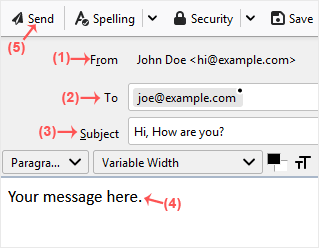
- Accueil
-
Boutique
- Tout parcourir
- Hébergement cPanel Standard
- Hébergement WordPress
- Hébergement Multi-Sites
- Cloud VPS Hosting
- OpenXchange
- Email Spam Filtering
- Google Workspace
- SSL Certificates
- CodeGuard
- SiteLock
- Marketgoo
- NordVPN
- Weebly Website Builder
- 360 Monitoring
- Courriel professionnel
- Services de courrier électronique
- Certificats SSL
- Sauvegarde de site Web
- Sécurité des sites Web
- Outils SEO
- VPN
- Constructeur de sites Web
- Surveillance des sites et des serveurs
- Enregistrer un nom de domaine
- Transférer un nom de domaine
- Actualités
- Base de connaissances
- Nous contacter
-
Plus
